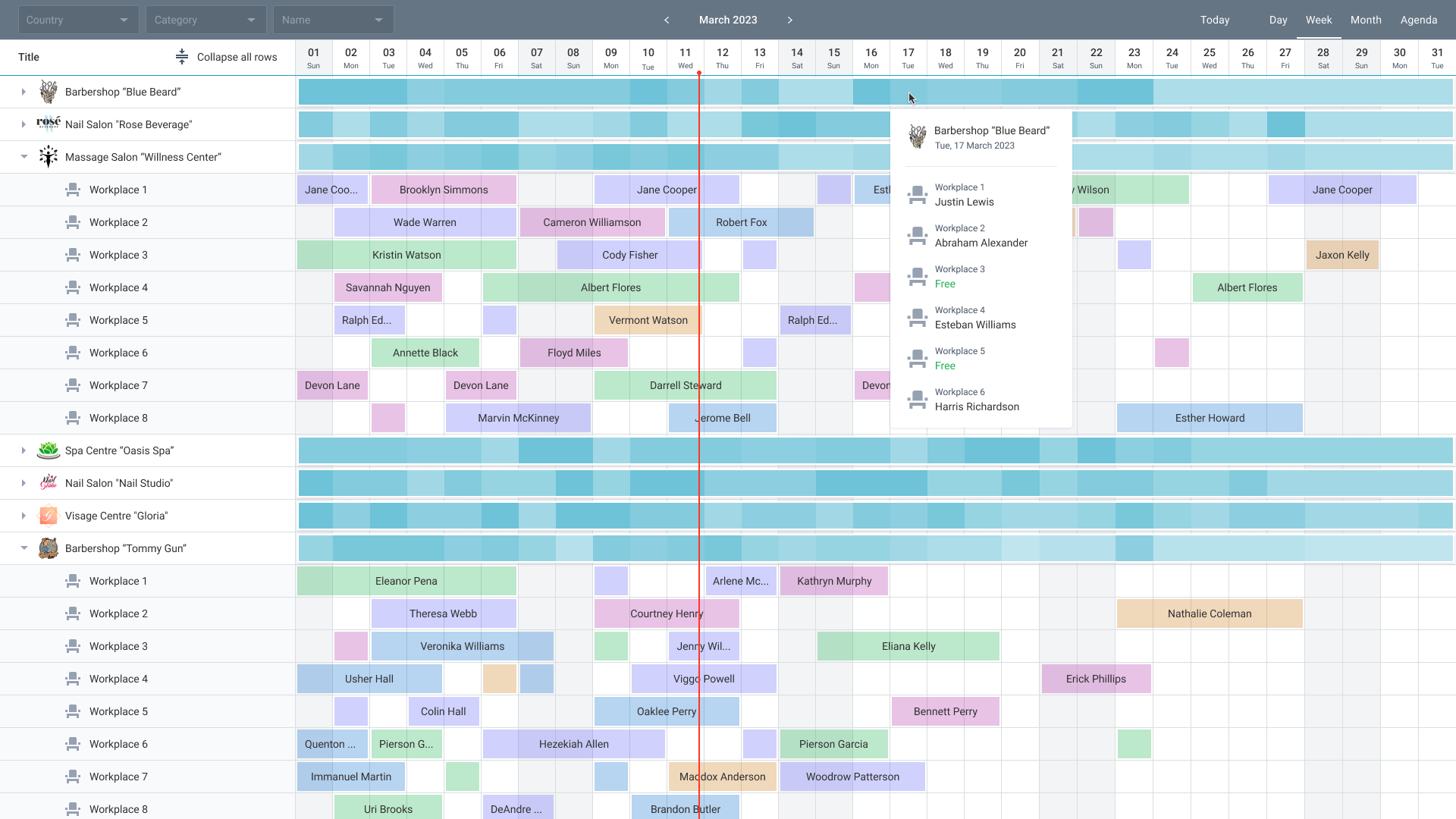
If you've ever watched a stylist sit idle for 45 minutes while the chair next to them is triple-booked, you already understand the core challenge of salon staff scheduling. Inefficient scheduling doesn't just frustrate your team — it directly erodes your bottom line. Studies show that salons using purpose-built salon staff scheduling software can increase appointment density by 20–35%, simply by eliminating the gaps that manual booking creates.
In this guide, we'll walk through proven strategies to optimize your salon's staff schedule, reduce costly downtime, and create a system that scales as your business grows — whether you're running a single chair or managing a multi-location brand.
Why Salon Staff Scheduling Is More Complex Than It Looks
Scheduling a salon isn't like scheduling a dentist's office. You're managing a "Tetris board" of variables: stylist skill sets, service durations, chemical processing times, room availability, and client preferences — all simultaneously. A single miscalculation can create a cascade of delays that ruins the entire day's flow.
Common scheduling pain points salon owners report include:
- Double-bookings caused by manual calendar errors
- Idle time between appointments that could be filled with add-on services
- Stylists working outside their licensed skill set
- No-shows that leave revenue gaps with no waiting-list backup
- Overtime costs from poor shift planning
The good news: every one of these problems is solvable with the right systems and strategies.
1. Audit Your Current Schedule for Hidden Inefficiencies
Before you can fix your scheduling, you need to understand where the gaps are. Pull your appointment data from the last 90 days and look for patterns:
- Recurring idle slots: Are there specific times of day or days of the week that consistently show low utilization?
- Service-to-stylist mismatches: Are clients being routed to stylists who aren't the best fit for their requested service?
- Cancellation clusters: Do no-shows spike on certain days or for certain service types?
Most modern salon management platforms include built-in analytics dashboards that surface these patterns automatically. If you're still relying on spreadsheets or paper books, this audit alone will reveal opportunities worth thousands of dollars per month.
2. Implement Split-Time Scheduling for Color Services
One of the highest-impact scheduling techniques for color-heavy salons is split-time scheduling. Instead of blocking a stylist's entire calendar for a 3-hour balayage appointment, you break the service into active and passive phases:
- Active phase: Application (45–60 minutes) — stylist is hands-on
- Passive phase: Processing time (30–60 minutes) — stylist is free
- Active phase: Rinse, tone, and finish (30–45 minutes) — stylist returns
During the passive phase, a skilled stylist can perform a secondary service — a trim, a brow wax, or a blowout — for another client. This technique alone can increase a stylist's daily revenue by 25–40% without adding a single extra hour to their shift.
To implement this effectively, your scheduling software must support multi-client booking with resource locking. GlowBook's scheduling engine handles this automatically, preventing double-booking while maximizing every available minute.
3. Sync Staffing Levels to Actual Client Demand
Many salon owners staff based on gut feel or historical habit rather than data. The result is overstaffing on slow Tuesdays and understaffing on peak Saturdays — both of which cost money.
A data-driven approach to staffing involves:
Analyzing Demand Heat Maps
Modern scheduling platforms generate heat maps showing your busiest hours and days. Use this data to align your staffing template with actual demand. If your data shows that 70% of your weekly appointments happen between Thursday and Saturday, your staffing plan should reflect that reality.
Implementing Staggered Shifts
Instead of having all stylists arrive at 9 AM and leave at 6 PM, stagger start times to extend your effective operating window. A stylist starting at 7 AM captures the early-morning professional crowd; one finishing at 8 PM serves clients who can't leave work early. This extends your revenue window without increasing total labor hours.
Using Standing Appointments for Predictable Revenue
Encourage your best clients to book standing appointments — a recurring slot reserved just for them every 4, 6, or 8 weeks. Standing appointments reduce the administrative burden of rebooking, improve client retention, and give you a predictable revenue baseline to schedule around.
4. Build a Digital Waiting List That Works Automatically
No-shows are inevitable. The question is whether you have a system to fill those gaps instantly or whether you're scrambling to call clients manually.
A digital waiting list integrated with your booking software can automatically notify the next eligible client the moment a cancellation occurs. When configured correctly, this system can fill 60–80% of same-day cancellations without any staff intervention.
Key features to look for in a waiting list system:
- Automatic SMS/email notifications to waitlisted clients
- Service-matching logic (only notify clients waiting for the specific service that opened up)
- Time-window filtering (don't notify clients who can't make it in 30 minutes)
- One-click confirmation to claim the slot
Pair this with automated appointment reminders sent 24–48 hours before each booking, and you can reduce no-shows by up to 70%, according to industry data from multiple salon software providers.
5. Map Services to Stylist Skill Sets — Not Just Availability
Routing a client to whoever has an open slot sounds efficient, but it often backfires. A junior stylist performing a complex balayage they're not ready for creates a poor client experience, potential rework costs, and reputational damage.
Skill-based routing ensures that:
- Complex color services are assigned to certified colorists
- Extension applications go to stylists trained in that technique
- New clients are matched with stylists who have availability for consultations
When you configure your booking software with service-to-skill maps, clients can only book specific services with qualified staff. This protects your quality standards while still maximizing utilization across your team.
6. Automate Shift Management and Communication
One of the biggest time drains for salon managers is handling shift swaps, time-off requests, and last-minute coverage via group texts and phone calls. This reactive approach creates confusion, missed messages, and scheduling errors.
Modern salon management platforms include built-in team communication tools that allow staff to:
- Request time off directly in the app (with manager approval workflows)
- Swap shifts with eligible colleagues without manager involvement
- Claim open shifts from a digital board
- Receive automated alerts for schedule changes
This shift from reactive to proactive scheduling communication reduces manager workload by an estimated 5–8 hours per week in salons with 6+ staff members.
7. Set Labor Cost Guardrails to Protect Profitability
Scheduling efficiency isn't just about filling chairs — it's about filling them profitably. Without labor cost guardrails, it's easy to schedule overtime that erodes your margins.
Best-in-class salon scheduling software includes:
- Overtime alerts: Notifications when a stylist is approaching their weekly hour threshold
- Break tracking: Automated enforcement of required break periods
- Clopen prevention: Alerts when a staff member is scheduled to close one night and open the next morning
- Labor-to-revenue ratio dashboards: Real-time visibility into whether your staffing costs are in line with your revenue
A healthy labor cost ratio for most salons falls between 40–50% of gross revenue. If your ratio is consistently higher, your scheduling strategy — not just your pricing — may need adjustment.
8. Run a 90-Day Scheduling Optimization Sprint
Transforming your salon's scheduling doesn't happen overnight. The most successful implementations follow a structured 90-day plan:
Days 1–30: Audit and Configure
Identify your top 3 scheduling pain points. Configure your software with accurate service durations, buffer times, skill maps, and resource assignments. Set up automated reminders and your digital waiting list.
Days 31–60: Pilot and Train
Enable self-service features for your team — shift swapping, mobile clock-ins, and time-off requests. Train staff on the new system and gather feedback. Monitor your no-show rate and appointment density weekly.
Days 61–90: Optimize and Scale
Use your reporting dashboard to identify remaining gaps. Adjust staffing templates based on demand data. If you're seeing consistent improvement, consider rolling out advanced features like split-time scheduling or standing appointment programs.
Salons that complete this 90-day sprint typically report a 15–25% improvement in appointment density and a measurable reduction in overtime costs.
Choosing the Right Salon Staff Scheduling Software
Not all scheduling tools are created equal. When evaluating platforms, prioritize these capabilities:
- Multi-stylist calendar views: Color-coded, real-time visibility across your entire team
- Resource locking: Prevents double-booking of rooms, equipment, and staff simultaneously
- Integrated client communications: Automated reminders, confirmations, and waiting-list notifications
- Reporting and analytics: Utilization rates, labor costs, and demand heat maps
- Online booking: 24/7 self-service booking that captures appointments even when you're closed
- Scalability: Ability to manage multiple locations from a single dashboard
GlowBook is purpose-built for salon and spa businesses, combining all of these features in one platform designed specifically for the beauty industry. See our pricing plans to find the right fit for your business size, or start a free trial and experience the difference optimized scheduling makes in your first week.
The Bottom Line
Salon staff scheduling is one of the highest-leverage areas of your business. Small improvements in appointment density, no-show rates, and labor cost management compound quickly into significant revenue gains. A salon generating $30,000 per month that improves its appointment density by just 15% adds $4,500 in monthly revenue — without a single new client.
The strategies in this guide — split-time scheduling, demand-aligned staffing, digital waiting lists, skill-based routing, and automated shift management — are all achievable with the right tools and a commitment to data-driven decision-making.
Ready to transform your salon's scheduling? Get started with GlowBook today and see how much revenue you've been leaving on the table.
Frequently Asked Questions
What is the best way to schedule salon staff to maximize revenue?
The most effective approach combines split-time scheduling for color services, demand-aligned staffing based on booking data heat maps, and a digital waiting list to fill cancellations automatically. Using salon scheduling software that supports multi-client booking and skill-based routing can increase appointment density by 20–35%.
How can salon scheduling software reduce no-shows?
Salon scheduling software reduces no-shows by sending automated SMS and email reminders 24–48 hours before appointments, enforcing cancellation policies with credit card holds, and maintaining a digital waiting list that instantly notifies clients when a slot opens. These combined measures can reduce no-shows by up to 70%.
What is split-time scheduling and how does it work in a salon?
Split-time scheduling divides color services into active phases (application and finishing) and passive phases (processing time). During the passive phase, the stylist is free to serve another client. This technique can increase a stylist's daily revenue by 25–40% without extending their working hours.
GlowBook Team
Beauty Business Experts
GlowBook helps salons, spas, and barbershops grow with all-in-one booking and management tools. Explore features or see pricing.